In modern office environments, prolonged sitting is often referred to as “new smoking.”
To improve health and increase work efficiency, more and more professionals and remote workers are turning to height-adjustable desks.
But is this really a worthwhile investment? Faced with a dazzling array of brands on the market, how do you choose?
As a professional office furniture brand, Meet&Co understands the importance of the work environment to work performance and mental well-being.
In this Standing Desk Reviews, we will provide an in-depth analysis of the advantages and disadvantages of standing desks, common types, and the 5 most recommended products for 2026.
Table of Contents
- What Is A Standing Desk & Who Should Use One?
- Pros And Cons Of Standing Desks: An Honest Look
- Types Of Standing Desks: Which One Fits Your Workspace?
- Standing Desk Comparison: Key Differences At A Glance
- Best Standing Desks Of 2026: Top 5 Reviewed 2026
- How To Choose A Standing Desk: Key Factors To Consider
- Final Thoughts: Is A Standing Desk Right For You?
- Standing Desk FAQs
What Is A Standing Desk & Who Should Use One?
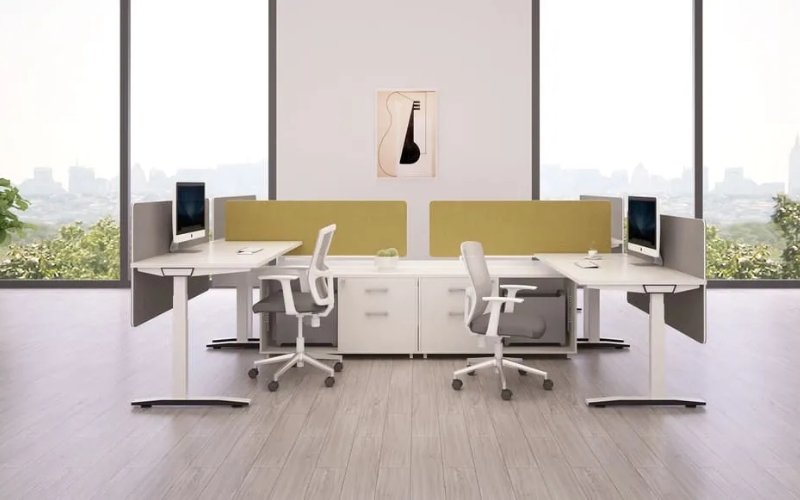
A standing desk, as the name suggests, is a piece of furniture that allows users to work while standing.
Modern standing desks typically have height adjustment capabilities, allowing users to freely switch between sitting and standing positions.
⇒ Also see: What Is A Riser Desk:Benefits, Types & Top Picks Explained
Who is best suited to use a standing desk?
- Those who work on computers for long periods (≥6 hours per day)
- Those who frequently experience discomfort in their lower back, neck, or shoulders
- Those who need a shared work environment with people of different heights
- Those working from home and wanting to improve their work pace
Who may not need one?
- Those with short working hours and low usage frequency
- Those with very low requirements for desktop stability
- Users with limited budgets and no health concerns
Pros And Cons Of Standing Desks: An Honest Look
Standing office desks are not a “perfect solution.” Understanding their advantages and limitations is crucial to avoiding disappointment after purchase.
Pros:
- Significantly Improved Posture: Standing naturally straightens the back, effectively preventing pressure on the cervical spine caused by prolonged head-down posture.
- Increased Metabolic Rate: Standing burns approximately 10-20 more calories per hour than sitting. While it cannot replace exercise, it has a positive effect on blood sugar control.
- Improved Mood and Energy: Standing significantly lowers cortisol (the stress hormone) levels, reducing “afternoon fatigue” between 2 PM and 4 PM.
Cons:
- Initial Adaptation Period: Suddenly switching from an 8-hour sitting posture to standing may cause leg swelling or foot pain. The “20-8-2 rule” is recommended: sit for 20 minutes, stand for 8 minutes, and move around for 2 minutes.
- Stability Challenges: Inexpensive height-adjustable desks, when raised to their highest point, can cause monitor shaking while typing, affecting the visual experience.
- Cost and Maintenance: Electric desks involve motor lifespan and circuit safety, making them more complex than regular desks.
⇒ Also see: The Benefits of a Standing Desk
Types Of Standing Desks: Which One Fits Your Workspace?
The difference in user experience between different types of uplift standing desks far outweighs their aesthetic differences.
Fixed Standing Desks: Height is fixed at around 105cm-110cm. Advantages include extreme stability and affordability.
Disadvantages include the inability to sit down, usually requiring a high stool. Not suitable for those who work long hours.
Electric Height-Adjustable Desks: The core component is the motor. Top-of-the-line models support intelligent height memory and one-button switching. Suitable for modern workplaces with extremely high efficiency requirements.
Mechanical Crank Desks: Height is adjusted manually using a crank. While energy-efficient and with a low failure rate, each adjustment may require 30-50 rotations.
Suitable for users who don’t frequently adjust height, have a limited budget, or use the desk temporarily.
Pneumatic Desks: Offer the fastest response time, similar to a gas chair. Simply press and pull the switch; noiseless and without electricity, ideal for mobile workspaces.
Exercise Desks: Leave space underneath for ultra-thin treadmills or quiet stationary bikes. This is no longer just office furniture, but a lifestyle. Suitable for specific users and lacks universal applicability.
Desk Converter: If you don’t want to throw away your old desk, this riser is the best option. It usually has a two-tier design, with separate shelves for the keyboard and monitor.
Because it’s inexpensive and doesn’t require replacing the entire desk, it’s suitable for first-time users.
Standing Desk Comparison: Key Differences At A Glance
Electric VS Manual Standing Desks
Electric desks are the mainstream choice, suitable for people who frequently change positions. Manual desks are more suitable for users with limited budgets who don’t plan to adjust the height often.
Studies show that manual desk users, due to the inconvenience of adjustment, often fix their desks at a certain height after a week, while electric desk users change their positions three times more frequently.
Single-Motor VS Dual-Motor
When choosing a height-adjustable standing desk, the motor is its “heart.” Many users only look at the price when purchasing, but overlook the differences in stability under long-term load.
The following table breaks down the core differences between the two in detail:
| Aspect | Single-Motor | Dual-Motor |
|---|---|---|
| Drive Structure | 1 motor + hexagonal drive rod | 2 synchronized motors (1 per leg) |
| Lifting Speed | Approx. 15–25 mm/s (slower) | Approx. 32–40 mm/s (faster) |
| Max Load Capacity | Typically 60–80 kg | Typically 120–160 kg |
| Noise Level | 50–60 dB (noticeable mechanical friction) | <45 dB (low-friction, quieter operation) |
| Stability | Less stable at heights above 110 cm; prone to left-right wobble | Highly stable; three-stage legs offer better rigidity |
| Durability | Moderate; linkage rods wear over time and motor bears higher load | Excellent; evenly distributed load and longer core lifespan |
| Installation Difficulty | More complex; requires manual alignment of rods and shafts | Easier; plug-and-play connections, higher assembly tolerance |
| Price Range | Entry-level (budget-friendly): $150–$300 | Moderate; linkage rods wear over time, and motor bears higher load |
Standing Desk VS Traditional Desk
Traditional desks are sturdy and inexpensive, but they restrict physical movement. Adjustable standing desks, on the other hand, are an investment in long-term health.
See the table below for specific differences:
| Comparison Item | Standing Desk | Traditional Desk |
|---|---|---|
| Flexibility | High | Low |
| Health Benefits | High | Low |
| Cost | Medium to High | Low |
| Service Life | Depends on structure | Stable |
Best Standing Desks Of 2026: Top 5 Reviewed 2026
Best Overall Standing Desk – SENDI Electric Height Adjustable Desk
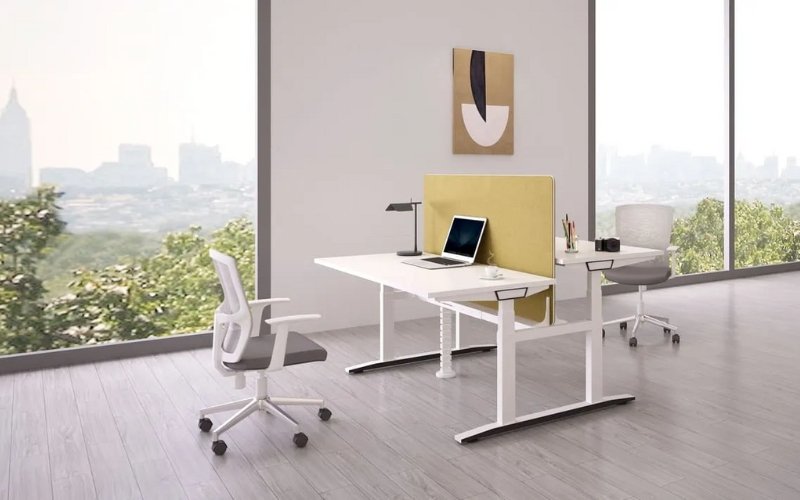
The Sendi electric height-adjustable desk is a high-performance office furniture piece offering excellent value.
Its simple, white color scheme, coupled with extensive customization options, allows it to seamlessly integrate into any office space with its décor.
Excellent cable management, multiple height adjustment ranges, privacy-promoting fabric partitions, and a sensitive height preset memory function are all highlights of this desk.
| Height range | 650mm-1290mm |
| Size | 1200*1200*610/1260H 1400*1200*610/1260H 1400*1400*610/1260H 1600*1400*610/1260H 1800*1400*610/1260H |
| Preset memory | 3 |
| Load capacity | 450 lbs |
| Warranty | 3 years |
Best Standing Desk For Home Offices – Meet&Co Adjustable Lifting Standing Desk
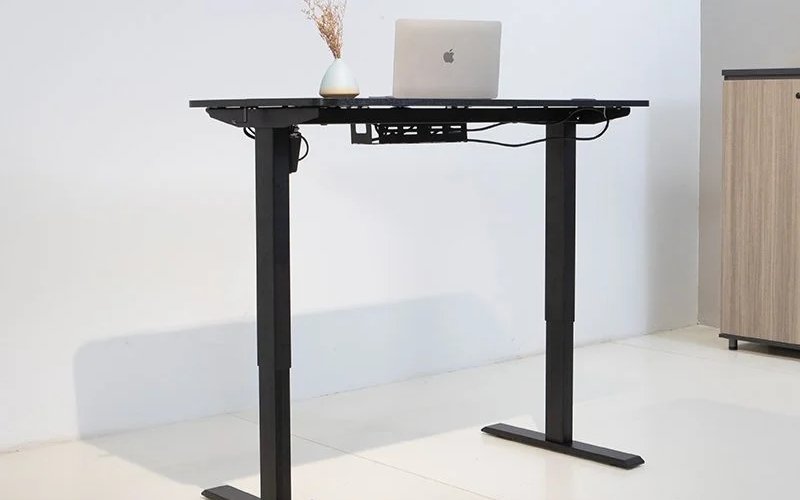
The Meet&Co Adjustable Lifting Standing Desk features a modern design with a digital display, allowing for one-touch height adjustment to your desired level.
Unlike other height-adjustable desks, it boasts a single-motor design, a simple overall structure, and easy assembly. It operates smoothly and quietly, making it ideal for those working from home.
The cable management system is located at the bottom of the desk, effectively reducing desktop clutter and creating a more organized workspace.
⇒ Also see: The 10 Best Standing Desks for Your Home Office in 2025
| Height range | 700cm-1170mm |
| Size | 1200*600*700/1200mm; Customizable |
| Preset memory | 2 |
| Load capacity | 700N |
| Warranty | 3 years |
Best L-shaped Standing Desk With Storage – Astra Height-Adjustable L-shaped Executive Desk
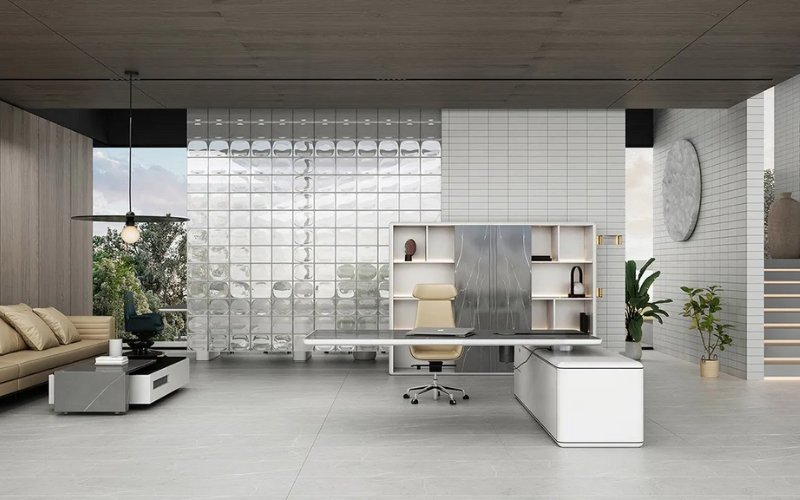
The Astra height-adjustable L-shaped desk is a new executive desk from Liftdesk, popular for its understated yet luxurious modern design.
It features four height presets that can be easily set with a single touch. Furthermore, it comes equipped with a wireless charging pad and a pop-up power outlet for added convenience in your daily work.
More importantly, this desk boasts multiple drawers and cabinets, providing ample storage for your documents, electronics, and personal belongings.
For added security, one drawer features a fingerprint lock, balancing privacy with ease of use.
⇒ Also see: The 10 Best L-Shaped Standing Desks in 2024
| Height range | 750mm-1420mm |
| Size | 2000 x 950mm, 2200 x 950mm |
| Preset memory | 4 |
| Load capacity | 1250N |
| Warranty | 1-3 years |
Best Standing Desk For Gaming – Secretlab Magnus Pro
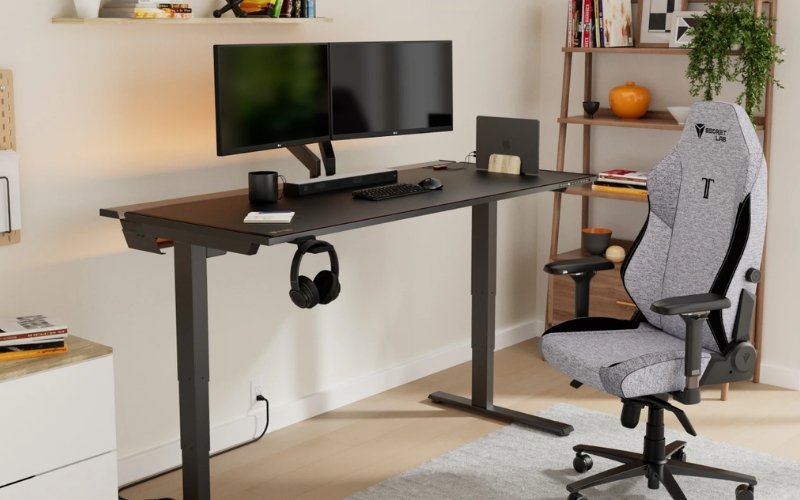
The Secretlab Magnus Pro is a high-end electric height-adjustable desk featuring smooth seat/stand adjustments, a professional-grade cable management system, and an integrated power supply.
Its sleek and modern design makes it suitable for office or high-end gaming environments.
The all-metal desktop structure provides excellent stability and durability, and it supports magnetic attachments for expansion, allowing for the creation of a clean and highly customizable workspace.
| Height range | 650mm-1250mm |
| Size | 1500mm x 700mm x 20mm |
| Preset memory | 3 |
| Load capacity | 120kg |
| Warranty | 5 years |
Best Budget Standing Desk – Fezibo Electric Standing Desk
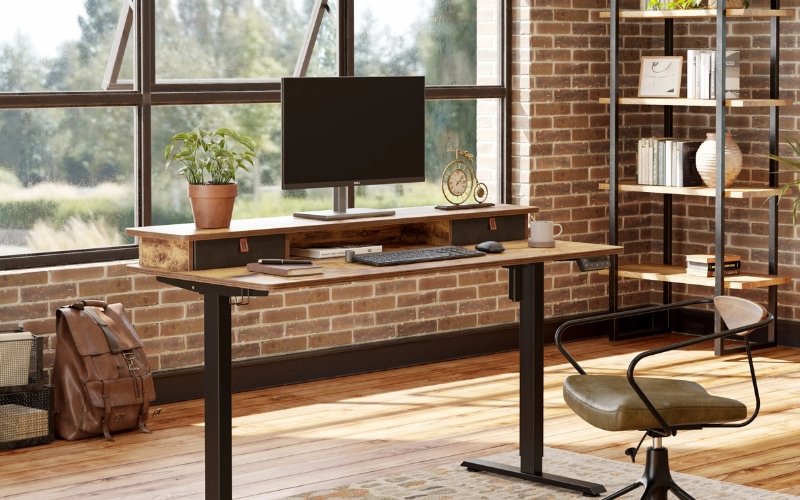
The Fezibo Electric Standing Desk is a cost-effective electric height-adjustable desk with electric height adjustment and memory presets.
Its sturdy construction allows for smooth transitions between sitting and standing positions, making it suitable for home or light office environments.
It typically features cable management, a height preset button, and a quiet motor, making assembly relatively simple and the price affordable.
⇒ Also see: 10 Best Budget Standing Desks in 2025
| Height range | 27.6-46.9 inches |
| Size | 40 inches x 24 inches 48 inches x 24 inches 55 inches x 24 inches 60 inches x 24 inches |
| Preset memory | 3 |
| Load capacity | 176 lbs |
| Warranty | 2-5 years |
How To Choose A Standing Desk: Key Factors To Consider
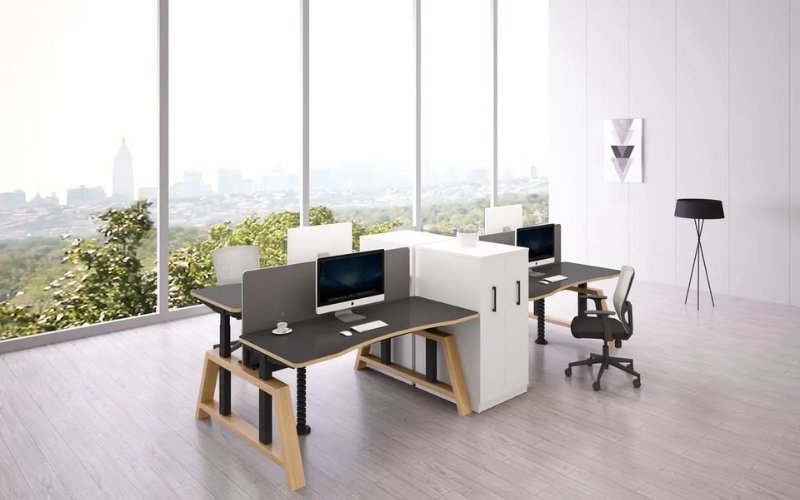
Among numerous Standing Desk reviews, what truly differentiates products isn’t appearance, but rather some easily overlooked yet crucial factors that directly impact long-term user experience.
The following six points are key indicators to focus on when choosing a standing desk.
1. Height Adjustment Range
The height adjustment range determines whether this standing desk truly adapts to your height and usage habits.
- For seated work, the desktop height is typically in the 65–75 cm range.
- For standing work, the desktop height may need to reach 105–125 cm.
An ideal electric standing desk should cover at least:
- A minimum height of less than 60 cm (suitable for shorter users or those using ergonomic chairs)
- A maximum height of around 120 cm (ensuring arms hang naturally and shoulders are relaxed when standing)
👉 Purchase Recommendation
For home or shared office environments, prioritize models with a wider adjustment range, rather than products that only accommodate a single height.
2. Stability
Stability is one of the most easily overlooked yet crucial indicators of a standing desk, especially when the desktop is raised to its highest point.
Common factors affecting stability include:
- Leg structure (T-shaped / C-shaped / four-legged structure)
- Frame steel thickness
- Whether dual motors are used
- Desktop size and weight distribution
Practical points to consider when assessing stability:
- Does the desktop wobble while typing?
- Does it wobble noticeably after placing two monitors?
- Is the height adjustment smooth and without shaking?
👉 Purchase Recommendations
- Single monitor, small desktop: A high-quality single motor is acceptable.
- Large desktop, dual screens, or B2B scenarios: Prioritize dual-motor structures.
3. Safety Protection (Collision Detection)
During the lifting and lowering process of an electric standing desk, the lack of safety protection poses a risk of pinching, damaging furniture, or equipment.
The function of collision detection:
- When the desktop comes into contact with an obstacle (such as a drawer, chair, or cabinet) during lifting and lowering
- The system will automatically stop and reverse to prevent further pressure.
This function is especially important in the following scenarios:
- Home office (with children or pets)
- Complex space under the desk with many cables
- Dense office workspaces
👉 Purchase Recommendation
Choose products that clearly indicate an Anti-collision System / Safety Sensor, rather than relying solely on the “emergency stop” button.
4. Cable Management
Cable management directly affects:
- Desktop tidiness
- Smoothness of height adjustment
- Lifespan of power and data cables
Common but undesirable situations include:
- Cables are being pulled during height adjustment
- Power strips dangling in the air, posing a safety hazard
- Clutter under the desktop
Excellent standing desks typically provide:
- Cable trays or concealed cable management channels
- Cable routing holes on the desktop
- Cable management space matches the height adjustment path
👉 Purchase Recommendations
If you use multiple monitors, desktop computers, or a large number of peripherals, cable management design is just as important as the motor itself.
5. Motor Configuration
The motor is the “heart” of a standing desk, directly affecting its height adjustment capability and durability.
Single Motor
- Lower cost
- Suitable for small desktops and light loads
- Limited height adjustment speed and stability
Dual Motor
- Independent drive for left and right legs
- Smoother height adjustment and lower noise
- Stronger load-bearing capacity and longer lifespan
👉 Purchase Recommendations
- Home use, light office work: A high-quality single motor is acceptable
- Long-term office work, dual-screen setups, and enterprise purchase: Dual motors are a more reliable choice
6. Memory Presets
The memory function determines how frequently you will actually use the standing mode.
Without a memory function:
- Requires repeated fine-tuning for each height adjustment
- User experience is easily interrupted
- May actually reduce the frequency of standing use in the long run
Common features include:
- 2–4 height memory buttons
- One-button switching between sitting and standing height
👉 Purchase Recommendations
Even entry-level electric standing desks should have at least a basic height memory function; otherwise, the advantages of height adjustment will be significantly diminished.
⇒ Also see: How to Choose an Adjustable Standing Desk: An Ultimate Guide
Final Thoughts: Is A Standing Desk Right For You?
Standing desks aren’t a panacea, but they’re central to “dynamic office work.” The best working posture is always “the next posture.”
If you decide to invest in your health, we recommend starting with an electric height-adjustable desk with memory function.
Want to know how to arrange your new desk? Meet&Co Furniture offers professional desk layout and ergonomic advice.
If you encounter any problems during assembly, feel free to contact us anytime; we’ll help you resolve them as soon as possible.
Standing Desk FAQs
Q1: Does a standing desk help?
Yes, standing desks can be helpful, but only if used properly. It is recommended to switch between sitting and standing every 30–60 minutes.
Q2: How to stand at a standing desk?
When using a standing desk, keep your body naturally upright with relaxed shoulders and slightly bent knees.
The desk height should be such that your elbows are naturally bent at approximately 90 degrees, and the monitor should be at eye level or slightly lower.
Also, follow the principle of alternating between sitting and standing, changing your posture every 30–60 minutes to avoid standing continuously for extended periods.
Q3: How to reset the standing desk?
To reset a height-adjustable desk, first disconnect the power for 10–30 seconds, then reconnect it. Next, press and hold the lower button to lower the desk to its lowest position.
Continue holding the button at the lowest point for 5–10 seconds until the desk springs back or the display returns to zero.
For models with a display screen, you may need to press and hold both the lower button and the M button simultaneously at the lowest point.
If this still doesn’t work, please consult the instruction manual or contact customer service.
Q4: How does a standing desk work?
The working principle of an adjustable desk is to allow users to freely switch between sitting and standing postures by adjusting the height of the desktop.
Q5: What is the proper height for a standing desk?
The height of a standing desk should vary from person to person.
Generally, the ideal height is when your elbows are naturally bent at about 90 degrees, the desktop is level with or slightly lower than your elbows, your shoulders are relaxed, and your wrists are neutral.
At the same time, the top edge of the monitor should be level with or slightly lower than your line of sight, avoiding looking down or up.
Q6: How to fix a standing desk?
When a height-adjustable desk malfunctions, first check the power supply and wiring, and try powering it off and on again.
If it still cannot be raised or lowered, press and hold the lower button to lower the desktop to its lowest position and reset it.
If the height adjustment is stuck or unbalanced, check for overloading or obstructions. If the problem persists, it is recommended to contact after-sales service or a professional repair technician.
Q7: Can a standing desk help you lose weight?
Standing desks don’t directly cause weight loss, but they can help increase daily energy expenditure to some extent.
Generally, standing burns about 0.15–0.2 kcal more per minute than sitting, which can help reduce sedentary time in the long run. However, weight loss still needs to be combined with exercise and diet.


