
Introduction: Why Every Home Office Needs A Standing Desk
Studies show that people who sit for more than 6 hours a day have a 30% higher risk of cardiovascular problems than active individuals.
Prolonged sitting not only leads to stiff neck and shoulders, lumbar spine strain, and slowed blood circulation but may also increase the risk of metabolic syndrome.
In recent years, home office standing desks have gradually become a popular choice for working from home.
Whether you’re working full-time at home, holding remote meetings, or creating content, a standing desk allows you to switch between sitting and standing freely, making your thinking clearer and your focus better.
The following five recommended standing desks are based on the experience of the Meet&Co team in assembling and testing over 25 height-adjustable desks. I believe they are the best choices currently available. Now, let’s reveal them!
Our picks of the best standing desks for home office:
- Sendi Electric Standing Desk
- Meet&Co Lifting Standing Desk
- Uplift V3 Standing Desk
- Branch Duo Standing Desk
- Vari L-Shape Electric Standing Desk
Buying Guide: 5 Key Factors To Choose The Right Standing Desk
1. Height Adjustment Range and Ergonomic Match
Only desks conforming to BIFMA standards truly meet ergonomic needs. When seated, the desktop height should be at a 90-degree angle to the elbows when naturally bent.
When standing, the desktop height should be slightly lower than the elbows by 1-2 cm. The ideal height adjustment range for a standing desk is 65-130 cm.
Different heights require fine-tuning of the desktop height. If you are under 160 cm tall, the desktop height should be below 65 cm.
If you are between 160-185 cm tall, the desktop height should be between 65-125 cm. If you are taller than 185 cm, the desktop height should be greater than 125 cm.
2. Stability and Load Capacity
If you plan to place other devices besides a computer on the desk, you need to pay special attention to its maximum load capacity.
Desks with a load capacity of less than 50 kg are light-duty desks, suitable for users with a single device.
Desks with a load capacity of more than 80 kg are heavy-duty desks, suitable for multi-monitor setups and configurations with robotic arms.
Additionally, you need to ensure the desk doesn’t wobble or sway when you lean against it.
3. Electric vs. Manual
Electric height-adjustable desks are faster, smoother, and more stylish, but they are more expensive. Manual height-adjustable desks, on the other hand, are more suitable for users with limited budgets.
They are economical and easy to maintain, but require some effort. If you adjust the desk height more than 5 times a day, an electric desk will be more efficient and save time.
4. Desk Size and Space
If your desk will house a laptop and monitor, you need to ensure you choose a suitable desk size and space.
When home space is limited, a desk width of 100-120cm and a depth of 60cm is recommended.
Avoid choosing a desk that is too large, as this will obstruct movement; one that is too small will affect comfort.
If you cannot find the size you want, you can choose a retailer that offers desktop customization services.
5. Noise, Speed, and Safety
A high-quality motor should have a noise level below 50 decibels and a lifting speed of≥30mm/s. Especially when you’re in an extremely quiet office area, a height-adjustable desk like this can minimize distractions.
Furthermore, the anti-collision detection function is also very important, especially for families with children and pets. It can stop the height adjustment when an obstacle is detected.
🏆 Best 5 Home Office Standing Desks In 2026 (Expert Tested & Reviewed)
Below are my five best home office standing desks of 2026, selected based on five criteria: stability, ergonomic design, user experience, aesthetic integration, and cost-effectiveness.
1. Sendi Electric Height Adjustable Desk
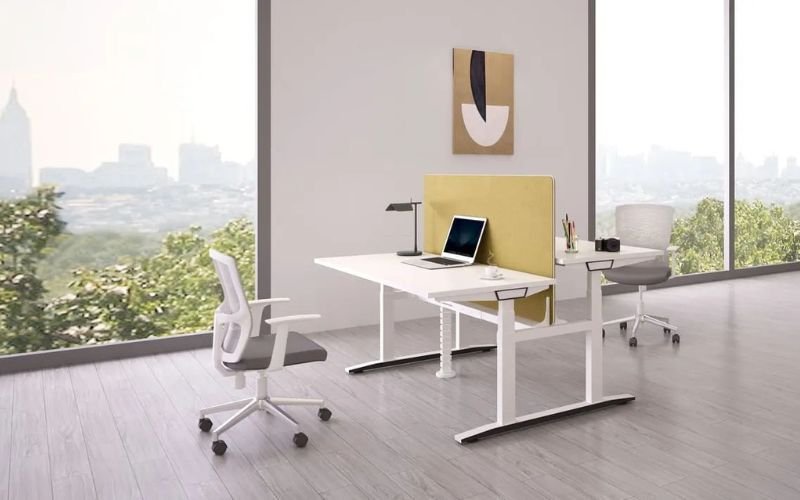
For years, the Sendi series has been one of our top choices for standing desks, thanks to its durability, stability, and extensive customization options.
The Sendi electric height-adjustable desk is available in a variety of sizes and colors to suit workspaces of all sizes and styles.
With a standard height of 650mm and a maximum height of 1290mm, this desk can be fully adjusted to suit the user’s height.
Equipped with an intuitive control panel and height memory preset, it allows for quick and easy adjustment to the ideal height with the touch of a button, effortlessly switching between sitting and standing positions.
Furthermore, the Sendi height-adjustable desk features a relatively quiet dual-motor system, so you’ll never have to worry about disturbing those around you.
➤ If you’re planning to buy a height-adjustable desk soon, Meet&Co and Liftdesk are both excellent choices!
Pros:
- Customizable, various sizes and colors available
- Features anti-collision detection
- Excellent stability at heights, no wobbling
- Equipped with a concealed cable box for convenient cable management
- An optional fabric screen provides some privacy
Cons:
- The anti-collision function sometimes malfunctions
- No storage
Specfications:
| Desktop Size | 1200*1200*610/1260H; 1400*1200*610/1260H; 1400*1400*610/1260H; 1600*1400*610/1260H; 1800*1400*610/1260H |
| Height Range | 25.6 – 50.8 inches |
| Maximum Weight | 450 pounds |
| Warranty | 3 years |
2. Meet&Co Adjustable Lifting Standing Desk
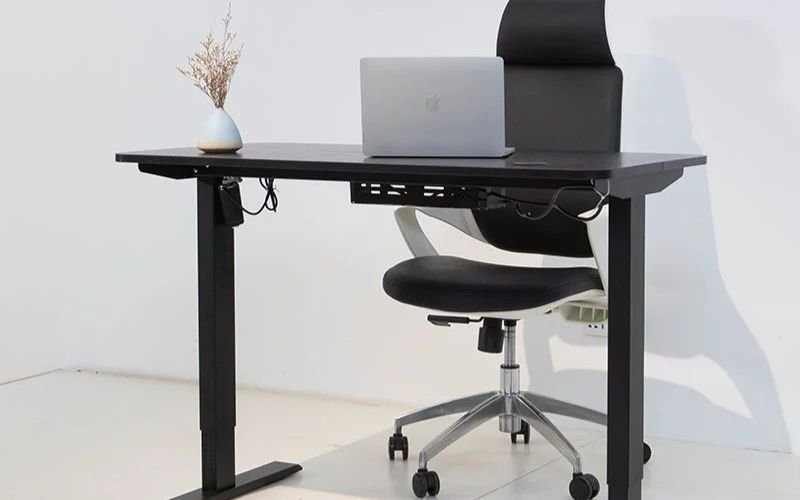
The Meet&Co Adjustable Lifting Standing Desk is an ergonomic, practical, and aesthetically pleasing office furniture piece.
Featuring a two-section upright design, the frame is exceptionally sturdy. It can support up to 250kg, easily accommodating everyday office supplies such as monitors, computers, and documents.
Even at its maximum height of 117cm, there is no noticeable wobbling when pressing the edge of the desktop. This desk uses an electric height adjustment system, rising smoothly at a speed of 40mm/s.
Its operating noise level is below 50 decibels, equivalent to the volume of a quiet conversation, ensuring it won’t disrupt concentration even in a quiet office environment or home study.
What I like most is its two memory preset options, eliminating the need for repeated manual adjustments and allowing you to switch to the most comfortable working posture with a single button.
Pros:
- Simple design and easy operation
- Quick and quiet height adjustment
- Customizable height presets
- Stable at any height
- Excellent cable management
Cons:
- Requires self-assembly
Specfications:
| Desktop Size | Standard size (7.2″ × 23.6″ × 27.6″), customizable |
| Height Range | 27.6 – 46.1 inches |
| Maximum Weight | 551.16 pounds |
| Warranty | 3 years |
3. Uplift V3 Standing Desk
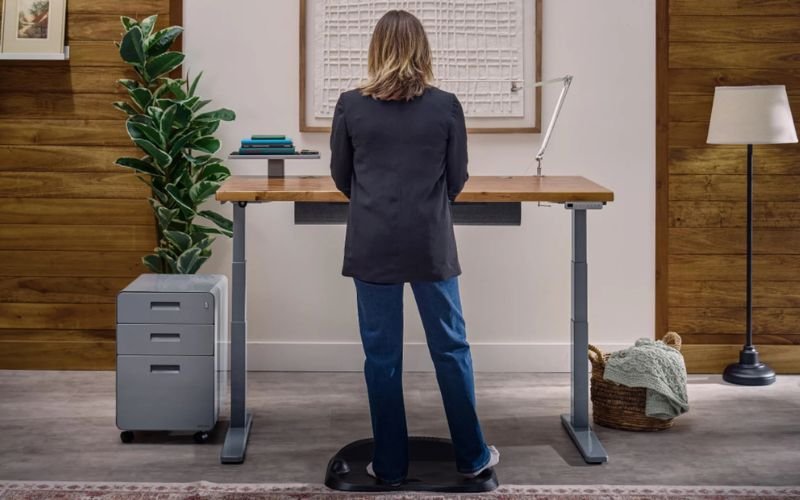
As an upgrade to the Uplift V2, the Uplift V3 features a reinforced steel base, ensuring rock-solid stability at any height.
However, the biggest highlight of the Uplift V2 standing desk is its customizable height. From the desktop material and frame style to the keyboard and various accessories, it offers comprehensive personalization options.
Equipped with a six-axis gyroscope anti-collision sensor with adjustable sensitivity, it automatically stops and reverses within 0.3 seconds when encountering obstacles (such as legs, pets, or office supplies) during height adjustment, preventing crushing damage.
Pros:
- Extremely quiet operation
- Fast lifting speed, reaching the highest height in just 13 seconds
- Quick and simple assembly
- Extremely stable frame
- Superior FlexMount cable management system
Cons:
- Too many choices can be overwhelming
- Fully customizable, expensive
Specfications:
| Desktop Size | 42″ × 30″; 48″ × 30″; 60″ × 30″; 72″ × 30″; 80″ × 30″; 42″ × 24″; 48″ × 24″; 60″ × 24″; 72″ × 24″; 80″ × 24″ |
| Height Range | 22.6 – 48.7 inches |
| Maximum Weight | 355 pounds |
| Warranty | 15 years |
4. Branch Duo Standing Desk
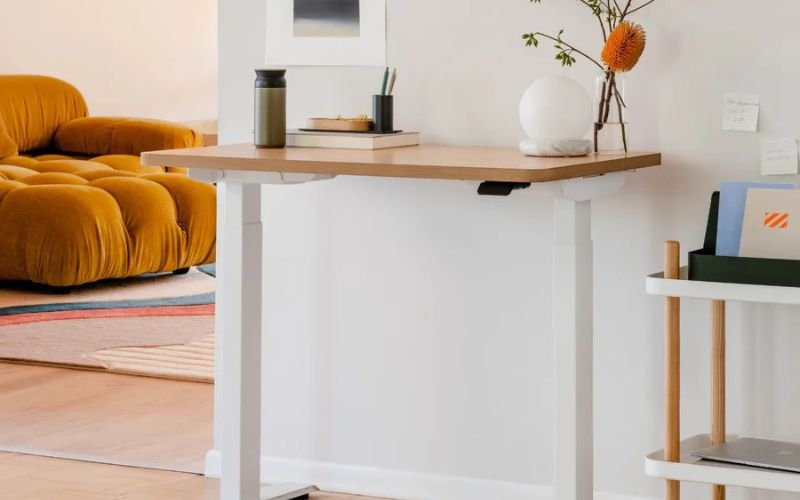
The Branch Duo standing desk, from the New York-based brand Branch, is an electrically adjustable standing desk suitable for small offices or apartments, with a minimum size of 36 x 24 inches.
It offers two preset modes for seated and standing positions. You can also connect it to the Branch app (iOS only) via Bluetooth to wirelessly control your desk, set standing time and reminders, and even track posture.
Unlike other standing desks with digital displays, it uses a lever-style control panel for height adjustment. Lifting up raises the desktop, and pressing down lowers it.
Pros:
- Compact, small footprint
- Pre-drilled holes for easy installation
- Thoughtful design details, such as rounded corners and cable cutouts
- Customizable desktop and leg options
- Stable, durable, and easy to operate
Cons:
- Requires two people to install
- Limited size options
Specfications:
| Desktop Size | 36″ x 24″; 48″ x 24; 58″ x 27″ |
| Height Range | 28 – 47.3 inches |
| Maximum Weight | 275 pounds |
| Warranty | 10 years |
5. Vari L-Shape Electric Standing Desk
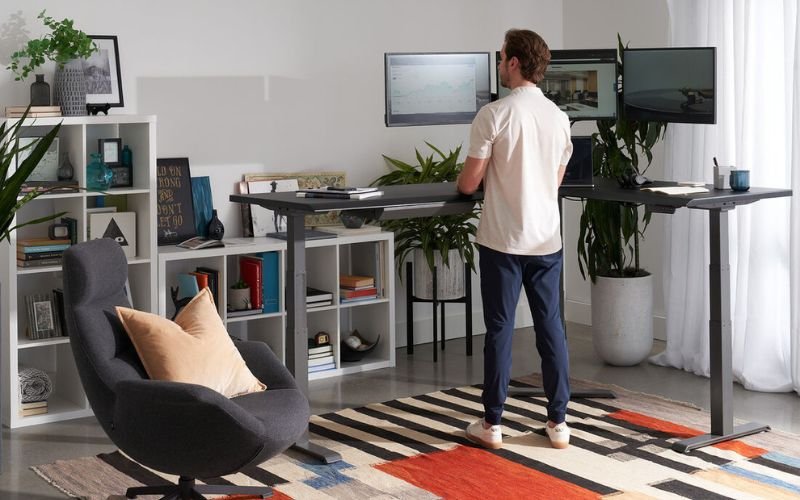
The Vari L-Shape Electric Standing Desk prioritizes space utilization, designed for professional studios, large home offices, and corporate settings.
With its flexible corner configuration, it supports installation on either side of a short desktop, allowing for adjustments based on room layout and preferred hand position.
Furthermore, this desk features four height memory settings, easily switched with a single button. Simple and intuitive operation requires no complex learning curve, making it suitable for users of all ages.
The three-motor drive system provides ample power while achieving whisper-quiet operation, minimizing noise interference during height adjustment.
Pros:
- Ergonomic curved front edge design
- L-shaped standing desks are designed for a flexible layout
- Easy installation by one person
- Convenient storage and cable management features
- Efficient and user-friendly height adjustment experience
Cons:
- Limited maximum load capacity
- Large and bulky size, difficult to move
Specfications:
| Desktop Size | 80″ x 60″; 80″ x 80″ |
| Height Range | 25 – 50.5 inches |
| Maximum Weight | 200 pounds |
| Warranty | Lifetime warranty |
Expert Testing Insights: Mistakes To Avoid & Long-Term Tips
Many users fall into some hidden pitfalls when purchasing or using uplift standing desks. These problems not only affect the user experience but can also lead to premature aging of the device.
Below are five common mistakes and five long-term maintenance tips summarized from my long-term testing experience—these will make your standing desk more stable, longer-lasting, and more comfortable.
⚠️ Mistake #1 — Choosing by Looks, Not by Stability
Many people buy standing desks with the mindset that aesthetics outweigh practicality, only to find, after bringing them home, that the desk wobbles significantly when adjusting its height.
Stability is actually the core of the standing desk experience.
- Testing method: Gently push the corners of the desk with both hands or place a heavy object before adjusting the height. If a “wobbling” sensation or abnormal noise occurs, it indicates insufficient structural support.
- Key considerations: Leg wall thickness, reinforced crossbeam design, base width (≥65cm is best).
💬 Expert advice: When using it for the first time, take a few minutes to accurately measure your ideal height with a tape measure, and save it as a memory mode (most electric desks have 1-4 height memory keys).
⚠️ Mistake #2 — Ignoring Ergonomic Fit
Many people find their shoulders still hurting after buying a desk, which is often because the height isn’t adjusted correctly.
- Elbows should form a 90° angle with the desk when standing.
- The top of the monitor should be slightly below eye level, about 5cm.
- Feet flat on the ground or use an anti-fatigue mat.
💬 Expert advice: When using it for the first time, take a few minutes to accurately measure your ideal height with a tape measure, and save it as a memory mode (most electric desks have 1-4 height memory keys).
⚠️ Mistake #3 — Overloading the Desk
Overloading is the number one killer of motors. Some people place multiple monitors, speakers, file racks, or even printers on their desks.
Prolonged overloading can cause a decrease in motor tension or an imbalance in height adjustment.
Safety standards:
- Light office work: ≤60kg
- Dual-screen designers or programmers: ≥80kg
- Professional workstations or audio equipment: 100kg and above
💬 Expert advice: Always leave a 20% margin. For example, if the rated load is 100kg, the actual load should not exceed 80kg.
⚠️ Mistake #4 — Poor Cable Management
The most common “failure” of power height-adjustable desks is not a mechanical problem, but rather a broken cable.
If the cable is too short or tangled during height adjustment, it can cause loose connections and controller malfunction.
Correct practices:
- Use cable management channels, clamps, or serpentine tubing under the desk.
- Leave ≥30cm of slack for the main power cord.
- Avoid leaving the power plug hanging in the air.
💬 Expert advice: Observe the cable routing after each height adjustment, especially around external monitors and the height control.
⚠️ Mistake #5 — Standing Too Long, Too Soon
Many beginners start too aggressively, standing for hours on end. This not only leads to leg fatigue but also easily causes a feeling of wanting to give up.
💬 Expert advice: Use a gradual adaptation method.
- Week 1: Stand for 30 minutes daily
- Weeks 2–3: Increase to 60–90 minutes
- From week 4 onwards: Adjust according to how you feel; the ideal ratio is “standing: sitting = 1:2”; use an anti-fatigue mat, footstool, or adjustable step stool.
Long-Term Tips for Desk Longevity
- Recheck screws and frame every 3–6 months: Regularly check and tighten with an Allen wrench.
- Clean motors and lubricate joints: Clean the motor housing and lifting column with a dry cloth every six months to prevent dust from entering. If the lifting mechanism feels stuck, gently wipe the slide rails with a non-sticky silicone lubricant.
- Calibrate the electric system: Raise the desk to its highest and lower it to its lowest position every three months to allow the system to re-recognize the height range. Many electric desks have automatic calibration functions. This prevents the system from “jamming” or accumulating errors.
- Keep the environment stable: Avoid placing the desk in direct sunlight, in high humidity, or on uneven ground for extended periods.
Conclusion: Find The Standing Desk That Fits Your Work And Lifestyle
A good home office standing desk isn’t about following trends, but about making a long-term investment in your well-being. We should choose the best home office standing desk based on our own height, room layout, and other factors.
For more information on purchasing advice regarding standing desks, please contact Meet&Co Office Furniture.
With over 8 years of experience in manufacturing and servicing world-class office furniture, including sofas, coffee tables, reception desks, and conference tables, we are committed to creating efficient and comfortable working environments for all employees.
We also offer 24/7 customer service to answer your questions, providing one-on-one dedicated service for everything from product selection and size customization to installation guidance and after-sales support. Feel free to contact us anytime!
Related Articles:
- The 10 Best Standing Desks for Your Home Office in 2025
- The 10 Best Adjustable Height Standing Desks
- How to Choose an Adjustable Standing Desk: An Ultimate Guide
FAQ: Standing Desk For Home Office
Q1: What is the best adjustable desk for home office?
Sendi’s standing desks are an excellent choice. They are affordable, have memory presets, are durable, and can be customized in color and size.
If you need storage, the Sendi E L-Shaped Executive Standing Desk can meet your needs.
Q2: Is it healthy to stand all day at a standing desk?
Standing for long periods of time with incorrect posture can easily lead to leg fatigue and increase pressure on the knees and back.
Q3: Do chiropractors recommend standing desks?
Most chiropractors support the use of height-adjustable desks, but caution against maintaining the same posture for extended periods.
Q4: Is a standing desk good for the spine?
Using a standing desk in moderation can promote the natural curvature of the spine and reduce stress on the lumbar spine.
Q5: How do I set up a standing desk in my home office?
First, determine the placement location, making sure to avoid direct sunlight. Then, assemble according to the instructions.
After assembly, adjust the tabletop to a height where your elbows are naturally bent at 90 degrees, and use a non-slip mat and comfortable foot pad for quick setup.


